Service Business Intake Automation
Overview
Earlier in my career working with service businesses and client operations, I noticed how many inquiries arrive through scattered channels — website forms, Yelp messages, and emails — with no structured way to track them.
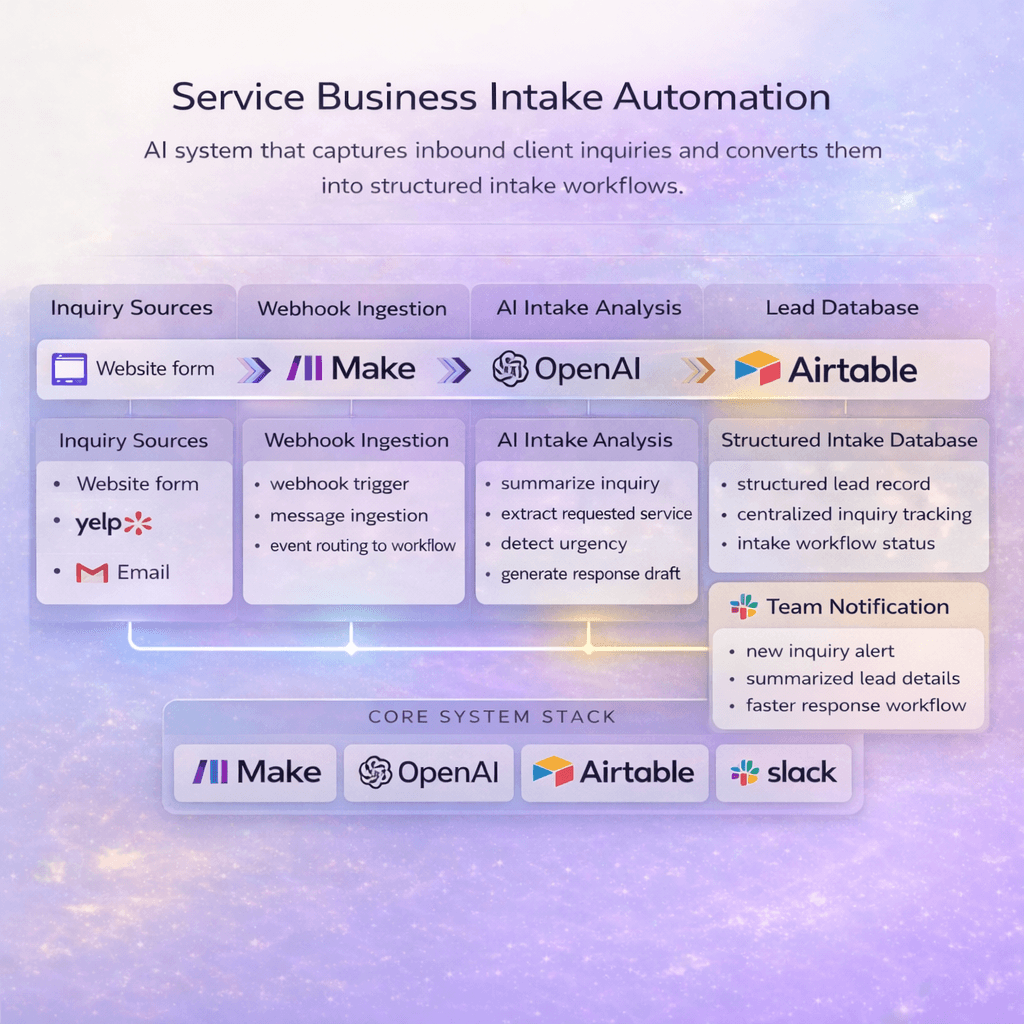
I built this system to automatically capture inbound inquiries, analyze the message content, and convert them into structured intake records so teams can respond faster and manage leads in one place.
Problem
Client inquiries are often scattered across platforms like website forms, review platforms, and inboxes.
Teams end up manually copying messages into spreadsheets or CRM tools, responding inconsistently, or missing opportunities entirely. Without a structured intake system, it’s difficult to track requests, prioritize responses, or maintain a consistent workflow.
Results
• Centralized intake pipeline for inquiries
• Faster response times
• Structured lead records instead of scattered messages
• Reduced manual intake work
Tech Stack
Make • OpenAI • Airtable • Slack • Webhooks